
Java
Collection
Collection是一个接口, 无法直接创建对象使用, 需要通过实现类来使用
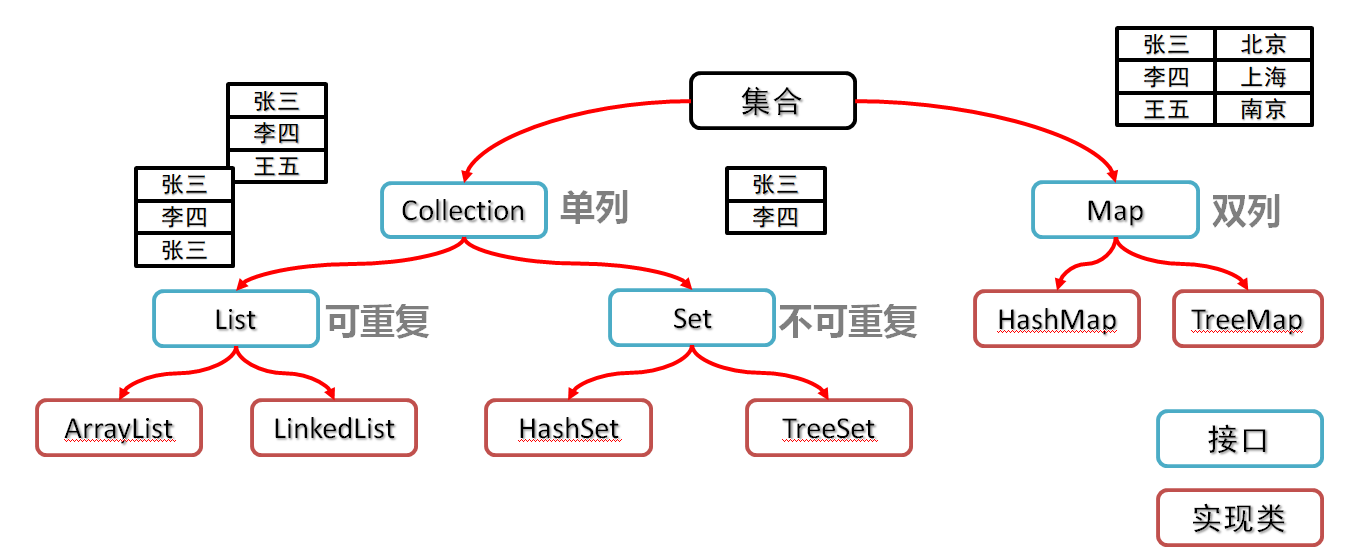
Collection集合概述- 是单例集合的顶层接口,它表示一组对象,这些对象也称为
Collection的元素 JDK不提供此接口的任何直接实现.它提供更具体的子接口(如Set和List)实现
- 是单例集合的顶层接口,它表示一组对象,这些对象也称为
创建
Collection集合的对象- 多态的方式
- 具体的实现类
ArrayList
基本方法
| 方法名 | 说明 |
|---|---|
| boolean add(E e) | 添加元素 |
| boolean remove(Object o) | 从集合中移除指定的元素 |
| boolean removeIf(Object o) | 根据条件进行移除 |
| void clear() | 清空集合中的元素 |
| boolean contains(Object o) | 判断集合中是否存在指定的元素 |
| boolean isEmpty() | 判断集合是否为空 |
| int size() | 集合的长度,也就是集合中元素的个数 |
基本使用
import java.util.ArrayList;
import java.util.Collection;

public class Demo1 {
    public static void main(String[] args) {
        //Collection是一个接口,如果想要使用, 就需要实现类配合实现多态的效果才可以使用
        Collection<String> coll = new ArrayList<>();

        coll.add("wang");
        coll.add("jia");
        coll.add("nian");

        coll.remove("jia");

        boolean flag = coll.contains("wang");
        System.out.println(flag);

        coll.clear();
        boolean empty = coll.isEmpty();
        System.out.println(empty);
        System.out.println(coll);
    }
}contains方法的比较方式
在ArrayList集合中, contains方法默认情况下, 是根据元素的equals()方法进行比较的。
源码细节
public boolean contains(Object o) {
        return indexOf(o) >= 0;
}

public int indexOf(Object o) {
    return indexOfRange(o, 0, size);
}

int indexOfRange(Object o, int start, int end) {
    Object[] es = elementData;
    if (o == null) {
        for (int i = start; i < end; i++) {
            if (es[i] == null) {
                return i;
            }
        }
    } else {
        for (int i = start; i < end; i++) {
            if (o.equals(es[i])) {
                return i;
            }
        }
    }
    return -1;
}//Student类没有重写equals()
import java.util.ArrayList;
import java.util.Collection;
public class Demo2 {
public static void main(String[] args) {
Collection<Student> list = new ArrayList<>();
list.add(new Student("zhangsan", 21));
list.add(new Student("lisi", 25));
list.add(new Student("wangwu", 30));
list.add(new Student("zhangsan", 21));
boolean result = list.contains(new Student("zhangsan", 21));
//Student类没有重写equals方法, 那么默认使用的就是继承下来的方法, 默认就是比较地址值
System.out.println(result);// false
}
}Student类没有重写equals方法, 那么默认使用的就是继承下来的方法, 默认就是比较地址值. 重写equals方法用于比较属性值
Collection的遍历方式
迭代器
迭代器常用方法:
| 方法名 | 说明 |
|---|---|
boolean hasNext() | 判断集合中是否还有元素可以取出 |
E next() | 返回指针指向的元素,并且指针指向下一个元素 |
void remove() | 删除指针指向的元素,并且指针指向下一个元素 |
import java.util.ArrayList;
import java.util.Collection;
import java.util.Iterator;

public class Demo1 {
    public static void main(String[] args) {
        // 创建一个存储字符串的集合
        Collection<String> coll = new ArrayList<>();
        // 向集合中添加三个字符串
        coll.add("hello");
        coll.add("world");
        coll.add("java");

        // 创建一个迭代器,用于遍历集合
        Iterator<String> it = coll.iterator();
        // 遍历集合中的每个元素
        while (it.hasNext()) {
            // 获取指针指向的元素, 并且移动指针指向下一个元素
            String str = it.next();
            // 输出当前元素
            System.out.println(str);
        }
        //1. 报错NoSuchElementException
        it.next();

        System.out.println("-------------------");
        //如果需要第二次遍历集合的元素, 就需要获取一个新的遍历器对象
        Iterator<String> it2 = coll.iterator();
        while (it.hasNext()) {
            if("333".equals(it.next())) {
                it.remove();
            }
        }
    }
}- 迭代器遍历集合时, 指针所指向的位置越界, 还强制访问会报错
NoSuchElementException - 迭代器遍历完毕后, 指针不会复位, 如果想要再次遍历就需要重新获取迭代器对象
- 循环中只使用一次
next(), 如果集合数量是奇数, 那么多次使用会报错NoSuchElementException, 导致越界访问 - 迭代器遍历时, 不能使用集合的方法进行增加和删除
增强for循环
- 增强
for底层就是迭代器, 为了简化迭代器的书写 JDK5之后出现, 其内部就是一个迭代器- 所有的单列集合和数组才能用增强
for循环
格式: for(集合/数组的数据类型 变量名 : 集合/数组名) {}
import java.util.ArrayList;
import java.util.Collection;

public class Demo3 {
    public static void main(String[] args) {
        Collection<String> coll = new ArrayList<>();

        coll.add("111");
        coll.add("222");
        coll.add("333");
        coll.add("444");
        coll.add("555");
        //str相当于一个第三方变量, 在循环的过程中依次表示每一个数据
        for(String str: coll) {
            System.out.println(str);
        }
    }
}可使用集合.for快捷键一件生成循环代码
Lambda表达式遍历
| 方法名 | 说明 |
|---|---|
default void forEach(Consumer<? super E> action) | 对集合中的每个元素执行指定的操作 |
注: Consumer是一个函数式接口
public class Demo3 {
    public static void main(String[] args) {
        Collection<String> coll = new ArrayList<>();
        coll.add("111");
        coll.add("222");
        coll.add("333");
        coll.add("444");
        coll.add("555");
        //1. 使用匿名内部类
        coll.forEach(new Consumer<String>() {
            //s依次表示集合中的每一个数据
            @Override
            public void accept(String s) {
                System.out.println(s);
            }
        });
        //Lambda表达式
        coll.forEach((String s) -> {
            System.out.println(s)
        });
        //Lambda表达式删减版, 类型可以省略, 只有一个参数小括号可以省略, 只能一句话{}可以省略
        coll.forEach(s -> System.out.println(s));

    }
}
List集合
List集合是Collection的一种. 所以Collection中的方法List都继承下来了
- 有序
- 有索引
- 可重复
基本方法
| 方法名 | 说明 |
|---|---|
void add(int index, E element) | 增 |
E remove(int index) | 删 |
E get(int index) | 改 |
E set(int index, E element) | 查 |
public class A01_ListDemo1 {
    public static void main(String[] args) {
        /*
        * void add(int index, E element)	增
        E remove(int index)	删
        E get(int index)	改
        E set(int index, E element)	查
        * */
        List<String> list = new ArrayList<>();
        list.add(0, "aaa");
        list.add(1, "bbb");
        list.add(2, "ccc");
        System.out.println(list);// [aaa, bbb, ccc]
        //元素添加到指定的索引处, 索引位置之后的元素都向后移动一位
        list.add(1, "ddd");
        System.out.println(list);// [aaa, ddd, bbb, ccc]
        list.remove(2);

        String str = list.get(1);
        System.out.println(str);
        list.set(1, "wjn");

    }
}
遍历方式
在包含之前四种遍历(迭代器, 增强for, Lambda, 普通遍历)的情况下, 新增的列表迭代器
列表迭代器
| 方法名 | 说明 |
|---|---|
void add(E e) | 在列表中的指定位置上添加元素, 索引位置之后的元素都向后移动一位 |
boolean hasNext() | 继承自Collection |
E next() | 继承自Collection |
void remove() | 继承自Collection |
void set(E e) | 替换当前元素 |
boolean hasPrevious() | 判断是否还有上一元素(了解) |
E previous() | 返回上一元素, 并且指针向前移动一位(了解) |
int nextIndex() | 返回下一个元素的索引(了解) |
int previousIndex() | 返回上一个元素的索引(了解) |
public class A02_ListDemo2 {
    public static void main(String[] args) {
        List<String> list = new ArrayList<>();

        list.add("aaa");
        list.add("bbb");
        list.add("ccc");

        ListIterator<String> it = list.listIterator();
        while (it.hasNext()) {
            String str = it.next();
            if("bbb".equals(str)) {
                //迭代器遍历时, 不能使用集合的方法进行增加和删除, 不然报错ConcurrentModificationException
//                list.add("qqq");
                //但可以使用迭代器本身的方法去添加
                it.add("qqq");
            }
        }
        System.out.println(list);

    }
}
Set集合
- 无序: 存取的顺序不一致
- 不可重复
- 无索引
实现类
HashSet: 无序, 不重复, 无索引LinkedHashSet: 有序, 不重复, 无索引TreeSet: 可排序, 不重复, 无索引
Set集合API基本与Collection一致
遍历方式
可使用迭代器, 增强for, Lambda
public class Demo1 {
    public static void main(String[] args) {
        //多态
        Set<String> set = new HashSet<>();
        System.out.println(set.add("hello"));
        System.out.println(set.add("hello"));
        set.add("world");
        //无序
        System.out.println(set);//[world, hello]
        //遍历方式: 迭代器
        Iterator<String> it = set.iterator();
        while (it.hasNext()) {
            String str = it.next();
            System.out.println(str);
        }
        //遍历方式: 增强for循环
        for (String str : set) {
            System.out.println(str);
        }
        //遍历方式: 匿名内部类
        set.forEach(new Consumer<String>() {
            @Override
            public void accept(String s) {
                System.out.println(s);
            }
        });

        //遍历方式: lambda表达式
        set.forEach(str -> System.out.println(str));
    }
}
HashSet
HashSet: 无序, 不重复, 无索引HashSet在JDk8以前底层使用了数组, 链表- 在JDK8以后, 使用了数组, 链表, 红黑树
元素存储位置的计算公式为: int index = (数组长度 - 1) & 哈希值
- 哈希值就是通过
hashCode()方法计算得来的int类型的整数 - 该方法定义在
Object类中, 默认使用地址值进行计算 - 一般情况下, 会重写
hashCode()方法, 利用对象内部属性计算哈希值
@Override
public boolean equals(Object o) {
    if (this == o) return true;
    if (o == null || getClass() != o.getClass()) return false;
    Student student = (Student) o;
    return age == student.age && Objects.equals(name, student.name);
}
//重写hashCode()方法
@Override
public int hashCode() {
    return Objects.hash(name, age);
}
信息
idea中直接使用快捷键就行, 不需要直接写
对象的哈希值特点:
- 如果没有重写
hashCode()方法, 不同的对象计算出的哈希值是不同的 - 重写了
hashCode()方法, 不同的对象只要属性值相同, 计算出的哈希值就相同 - 在小部分情况下, 不同的属性值或者不同的地址值计算出来的哈希值有可能相同(哈希碰撞)
//解释3
public class Demo2 {
    public static void main(String[] args) {
        //String类内部重写了hashCode()方法, 而下面两字符串恰好计算出的哈希值相同
        System.out.println("abc".hashCode());// 96354
        System.out.println("acD".hashCode());// 96354
    }
}
HashSet的底层实现原理
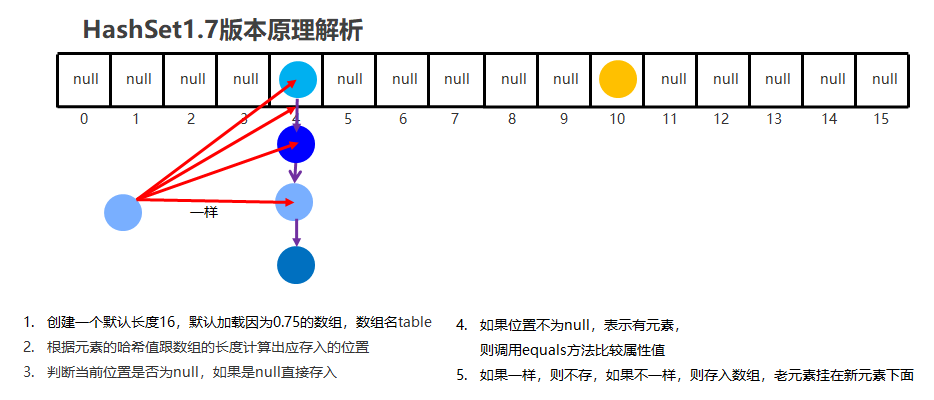
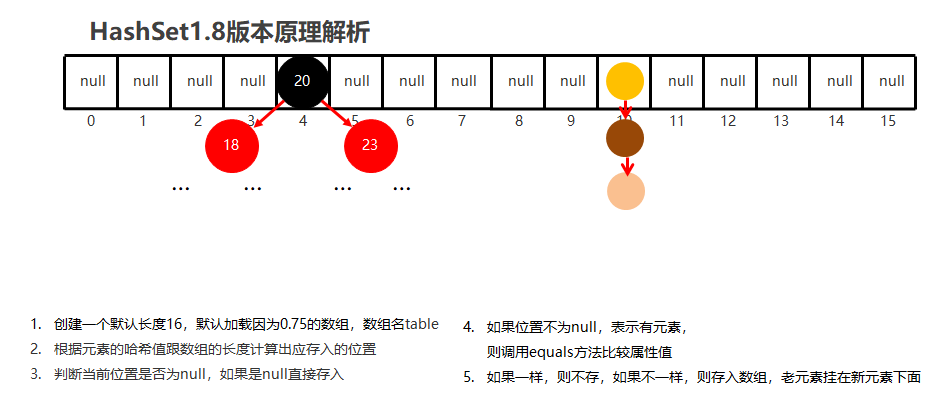
如果对象使用HashSet不重写equals和hashCode方法, 那么就默认使用地址值计算出来的哈希值进行判断HashSet是否存在重复的元素, 这时即便属性值一致, 但地址值不一致, 也会被认为是不同的对象, 进而存储到HashSet中.
没有重写equals和hashCode方法时
//没有重写equals和hashCode方法时
public class Demo3 {
    public static void main(String[] args) {
        HashSet<Student> set = new HashSet<>();
        set.add(new Student("张三", 18));
        set.add(new Student("张三", 18));
        set.add(new Student("李四", 19));
        set.add(new Student("王五", 20));
        System.out.println(set);

    }
}- 没有重写的输出:
[Student{name = 王五, age = 20}, Student{name = 张三, age = 18}, Student{name = 张三, age = 18}, Student{name = 李四, age = 19}] - 重写后的输出:
[Student{name = 张三, age = 18}, Student{name = 王五, age = 20}, Student{name = 李四, age = 19}]
LinkedHashSet
LinkedHashSet: 有序, 不重复, 无索引- 原理: 底层数据结构依旧使用哈希表, 只有又额外的多了一个双链表的机制记录存储的顺序.
public class Demo4 {
    public static void main(String[] args) {
        LinkedHashSet<String> lhs = new LinkedHashSet<>();
        lhs.add("a");
        lhs.add("b");
        lhs.add("c");
        lhs.add("d");

        System.out.println(lhs);
        //[a, b, c, d] --- 取出时是有序的

    }
}
TreeSet
- 底层数据结构是红黑树
TreeSet: 可排序, 不重复, 无索引
//遍历方式
public class Demo5 {
    public static void main(String[] args) {
        TreeSet<Integer> ts = new TreeSet<Integer>();
        ts.add(5);
        ts.add(3);
        ts.add(1);
        ts.add(4);
        ts.add(2);

        System.out.println(ts);
        //[1, 2, 3, 4, 5]
        //遍历方式
        Iterator<Integer> it = ts.iterator();
        while (it.hasNext()) {
            Integer i = it.next();
            System.out.println(i);
        }
        System.out.println("-------------------");
        for (Integer i : ts) {
            System.out.println(i);
        }
        System.out.println("-------------------");
        ts.forEach(i -> System.out.println(i));
    }
}
TreeSet的排序规则
- 数值类型:
Integer,Double, 默认按照从小到大的顺序进行排序 - 字符, 字符串类型: 按照字符的
ASCII码值进行排序
public class Demo1 {
    public static void main(String[] args) {
        TreeSet<String> ts = new TreeSet<>();

        ts.add("aa");
        ts.add("ab");
        ts.add("abb");
        System.out.println(ts);
        //输出结果: [aa, ab, abb]
    }
}public class Demo5 {
public static void main(String[] args) {
TreeSet<Integer> ts = new TreeSet<Integer>();
ts.add(5);
ts.add(3);
ts.add(1);
ts.add(4);
ts.add(2);
System.out.println(ts);
//[1, 2, 3, 4, 5]
//遍历方式
Iterator<Integer> it = ts.iterator();
while (it.hasNext()) {
Integer i = it.next();
System.out.println(i);
}
System.out.println("-------------------");
for (Integer i : ts) {
System.out.println(i);
}
System.out.println("-------------------");
ts.forEach(i -> System.out.println(i));
}
}举例
aa与ab, 两者第一位都是a, 那么则会比较第二位, 而第二位a < b, 则ab大排在后面aa与aab, 两者前二位相同, 而到第三位的时候, 字符串1后面没有了, 那么默认按照aab大排在后面
总结: 字符与字符串的比较方式, 是两个字符按照ASCII码值从左到右一一比较, 相等则两者都向右移动一位
对象类型作为TreeSet的泛型
public class Demo1 {
    public static void main(String[] args) {

        Student s1 = new Student("zhangsan", 23);
        Student s2 = new Student("lisi", 24);
        Student s3 = new Student("wanwu", 25);

        TreeSet<Student> ts = new TreeSet<>();
        ts.add(s1);
        ts.add(s2);
        ts.add(s3);
        System.out.println(ts);
    }
}
最终会报错
Exception in thread "main" java.lang.ClassCastException: class knowSet.Student cannot be cast to class java.lang.Comparable
TreeSet的泛型类型必须是实现Comparable接口的类, 因为自定义对象类型并没有比较大小的规则, 所以对此我们需要实现Comparable接口
比较方式1实现Comparable接口
//Comparable<E>, 中的E指的是要比较的是谁, 同时也对应着compareTo的第一个参数类型
public class Student implements Comparable<Student> {

    @Override
    public int compareTo(Student o) {
        return 0;
    }
}public class Student<E> implements Comparable<E> {
@Override
public int compareTo(E o) {
return 0;
}
}如果已经知道要比较的对象类型,那么可以直接使用形式一; 反之使用形式二
//javabean类
public class Student implements Comparable<Student> {
    private String name;
    private int age;

    public Student() {
    }

    public Student(String name, int age) {
        this.name = name;
        this.age = age;
    }

    /* getter setter */

    public String toString() {
        return "Student{name = " + name + ", age = " + age + "}";
    }

    @Override
    public int compareTo(Student o) {
        //this: 当前需要添加的元素
        //o: 已经添加到红黑树中的元素
        //返回值规则
        //返回负数: 认为要添加的元素是小的, 存左边
        //正数: 认为哟添加的元素是大的, 存右边
        //0: 认为要添加的元素已经存在, 舍弃
        int result = this.getAge() - o.getAge();
        return result;
    }
}public class Demo1 {
public static void main(String[] args) {
Student s1 = new Student("zhangsan", 23);
Student s2 = new Student("lisi", 24);
Student s3 = new Student("wanwu", 25);
Student s4 = new Student("zhaoliu", 26);
TreeSet<Student> ts = new TreeSet<>();
ts.add(s1);
ts.add(s2);
ts.add(s3);
ts.add(s4);
System.out.println(ts);
//返回结果: [Student{name = zhangsan, age = 23}, Student{name = lisi, age = 24}, Student{name = wanwu, age = 25}, Student{name = zhaoliu, age = 26}]
}
}提示
this: 当前需要添加的元素o: 已经添加到红黑树中的元素- 返回值规则
- 返回负数: 认为要添加的元素是小的, 存左边
- 正数: 认为哟添加的元素是大的, 存右边
- 0: 认为要添加的元素已经存在, 舍弃
- 第一次调用
compareTo()是当前元素与自己去比较, 自己与自己比较, 那么返回值一定是0, 这时集合中没有元素, 因此会添加. 这时一个例外, 与返回值的第三条规则不同.
比较方式2比较器
比较器的使用需要提及到TreeSet的二个构造方式TreeSet(Comparator<? super E> comparator), 而Comparator是一个函数式接口
public class Demo2 {
    public static void main(String[] args) {
        //需求1: 字符串按照长度排序, 如果一样长则按照字母排序
        TreeSet<String> ts = new TreeSet<>(new Comparator<String>() {
            @Override
            public int compare(String o1, String o2) {
                //o1:  当前需要添加的元素
                //o2: 已经添加到集合中的元素
                int result = o1.length() - o2.length();
                //如果长度一致按照原来字符串的排序形式(String内部已经实现了Comparable接口也重写了compareTo方法)排序, 否则先按照长度进行排序
                return result == 0 ? o1.compareTo(o2) : result;
            }
        });

        // 也可以使用lambda表达式
        /*
                TreeSet<String> ts = new TreeSet<>((o1, o2) -> {
                //o1:  当前需要添加的元素
                //o2: 已经添加到集合中的元素
                int result = o1.length() - o2.length();
                //如果长度一致按照原来字符串的排序形式(String内部已经实现了Comparable接口也重写了compareTo方法)排序, 否则先按照长度进行排序
                return result == 0 ? o1.compareTo(o2) : result;

        });
        */

        ts.add("123");
        ts.add("1234");
        ts.add("123456");
        ts.add("1235");
        System.out.println(ts);
        //输出结果为: [123, 1234, 1235, 123456]
    }
}
如何选择比较方式
首选第一种比较方式, 如果第一种比较方式不可以满足我们的需要就使用第二种
不满足的情况例如: 字符串的排序规则Java已经帮我们写好了, 如果我想要按照长度排序, 我不可能去手动更改源码. 而且String类是 最终类无法继承, 若不使用比较器Comparator, 就无计可施了.
如果比较方式一和比较方式二都存在, 则以方式二为准. 例如, String类已经在内部定义好了比较规则, 而我们定义了Comparator比较对象, 最终是按照Comparator比较规则排序.
总结集合使用场景
- 如果想要集合中的元素可重复, 则使用
ArrayList - 如果想要集合中的元素可重复, 而且当前的增删操作明显多于查询操作, 则使用
LinkedList - 如果想要集合中的元素不可重复, 则使用
HashSet - 如果想要集合中的元素不可重复, 而且保证存取顺序, 则使用
LinkedHashSet - 想要集合中的元素不可重复, 且保证存取顺序, 且保证元素按照某种规则排序, 则使用
TreeSet