Java
- 存储和读取数据
- 读和写都是按照程序为参照物
流的分类
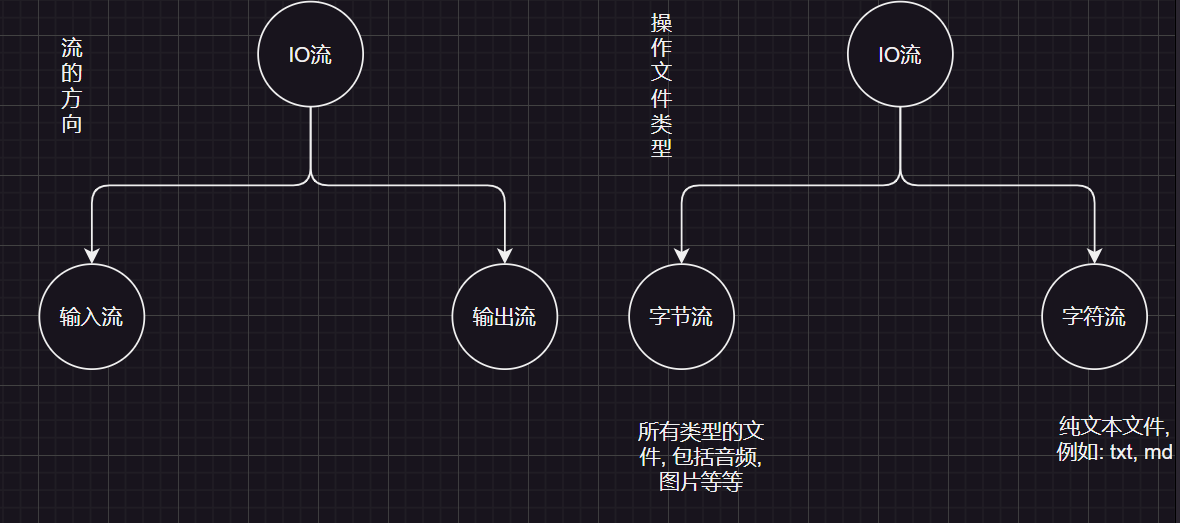
- 操作数据单位:字节流、字符流
- 数据的流向:输入流、输出流
- 输出流: 程序 ==> 文件
- 输入流: 文件 ==> 程序
- 流: 像水一样传输数据
什么是文本文件
用windows记事本打开,可以看的懂的文件, 例如: txt, md
流的结构
| 输入流 | 输出流 | |
|---|---|---|
| 字节流 | 字节输入流InputStream | 字节输出流OutputStream |
| 字符流 | 字符输入流Reader | 字符输出流Writer |
以上的流都是抽象类, 所有使用它们的实现类:
- 字节流:
FileInputStream,FileOutputStream - 字符流:
FileReader,FileWriter
文件流
FileOutputStream
- 字节输出流: 将数据写入文件
- 特点: 一次写入一个字节
构造方法
| 方法 | 描述 |
|---|---|
FileOutputStream(String name) | 创建一条文件输出流. |
FileOutputStream(File file) | 创建一条文件输出流. |
FileOutputStream(String name, boolean append) | 创建一条文件输出流. 如果第二个参数为true, 则追加数据. |
FileOutputStream(File file, boolean append) | 创建一条文件输出流. 如果第二个参数为true, 则追加数据 |
import java.io.FileOutputStream;
import java.io.IOException;

public class Demo1 {
    public static void main(String[] args) throws IOException {
        FileOutputStream fos = new FileOutputStream("day23-code\\aaa.txt");
        //写入数据
        fos.write(97);// a
        fos.write(98);// b
        fos.write(99);// c
        fos.write(100);// d
        //关闭流通道
        fos.close();
        //a.txt: abcd
    }
}
字节输出流的细节
- 创建字节流对象
- 参数可以是字符串路径, 也可以是
File对象 - 如果文件不存在, 会自动创建, 但需要保证父级路径存在, 例:
day23-code\\aaa.txt中aaa.txt可以不存在, 但day23-code一定存在. - 如果文件存在, 会清空文件内容, 若想要追加数据, 则设置
append参数为true
- 参数可以是字符串路径, 也可以是
- 写数据
write方法的参数是整数, 而实际上写入到本地文件的是ASCII码对应的字符.
- 释放资源
- 如果不释放资源, 那么读写文件时, 会造成文件被锁定, 不能被其他程序访问或者删除.
常用方法
| 方法名 | 作用 |
|---|---|
void write(int ch) | 写一个字符到文件中 |
void write(char[] cbuf) | 写一个字符数组到文件中 |
void write(char[] cbuf, int off, int len) | 写一个字符数组的一部分到文件中,从off开始,len个字符 |
void close() | 关闭流,释放资源,关闭后,流不能再使用,否则会抛出异常 |
import java.io.FileOutputStream;
import java.io.IOException;

public class Demo1 {
    public static void main(String[] args) throws IOException {
        FileOutputStream fos = new FileOutputStream("day23-code\\aaa.txt");
        String str = "abcddsaasdasds";
        //将字符串转换为字节数组
        byte[] bytes = str.getBytes();
        fos.write(bytes, 1, 3);
        fos.close();
    }
}
如何写入换行?
- window的换行符是
\r\n, 继承了MS-DOS 的换行符标准,\r只是放在当前行的开头,\n才是将光标移动到下一行 - linux的换行符是
\n, 为了简化文本处理,只使用\n来表示换行 - MAcOS的换行符是
\r
public class Demo1 {
    public static void main(String[] args) throws IOException {
        FileOutputStream fos = new FileOutputStream("day23-code\\aaa.txt");
        String str = "abcddsaasdasds";
        byte[] bytes = str.getBytes();
        fos.write(bytes, 1, 3);

        fos.write('\r');
        fos.write('\n');
        fos.write('a');
        fos.close();
    }
}
追加数据
将append选项设置为true
FileOutputStream fos = new FileOutputStream("day23-code\\aaa.txt", true);FileInputStream
- 字节输入流, 用来读取文件
- 一次读一个字节
常用方法
| 方法签名 | 描述 |
|---|---|
int read() | 从输入流中读取一个字节的数据,返回0到255之间的整数,如果到达文件末尾则返回-1。 |
int read(byte[] b) | 从输入流中读取最多 b.length 个字节的数据,并存储在字节数组 b 中,返回实际读取的字节数,如果到达文件末尾则返回-1。 |
int read(byte[] b, int off, int len) | 从输入流中读取最多 len 个字节的数据,并存储在字节数组 b 的 off 位置开始的位置,返回实际读取的字节数,如果到达文件末尾则返回-1。 |
void close() | 关闭此输入流并释放与之关联的所有系统资源。 |
long skip(long n) | 跳过并丢弃此输入流中的 n 个字节。 |
int available() | 返回此输入流中的剩余字节数 |
void mark(int readlimit) | 在此输入流上放置一个标记。 |
void reset() | 将此输入流重新定位到最后一次调用 mark 方法时的位置。 |
boolean markSupported() | 测试此输入流是否支持 mark 和 reset 方法。 |
循环读取
如果文件的数据很多, 那么一次读一个然后输出, 会很慢, 所以我们可以用循环来读取文件, 每次读取一行, 然后输出一行.
根据read方法的特性, 只要读取的不是-1就可以一直读
import java.io.FileInputStream;
import java.io.IOException;

public class Demo3 {
    public static void main(String[] args) throws IOException {
        FileInputStream fis = new FileInputStream("day23-code\\aaa.txt");
        int i;
        //read方法每读一次数据, 就移动一次指针
        while ((i = fis.read()) != -1) {
            //又一次使用fis.read()则又会移动一次指针, 导致结果出错
            System.out.println(fis.read());
            System.out.println((char) i);
        }
    }
}
文件拷贝
- 思路: 将输入流的数据写入到输出流中, 实现文件拷贝
- 即: 输入流 ==> 程序 ==> 输出流
import java.io.FileInputStream;
import java.io.FileOutputStream;
import java.io.IOException;

public class Demo4 {
    public static void main(String[] args) throws IOException {
        FileInputStream fis = new FileInputStream("day23-code\\aaa.txt");
        FileOutputStream fos = new FileOutputStream("day23-code\\bbb.txt");
        int i;
        while ((i = fis.read()) != -1) {
            fos.write(i);
            System.out.println(i);
        }
        //释放资源规则: 先开的最后释放
        fis.close();
        fos.close();
    }
}
但上述方法一次读取一个, 如果文件太大, 例如36.9MB ==> 38769986字节, 一次读取一个字节, 就需要循环38769986次.
优化: 一次读取多个数据
import java.io.FileInputStream;
import java.io.FileOutputStream;
import java.io.IOException;

public class Demo5 {
    public static void main(String[] args) throws IOException {
        FileInputStream fis = new FileInputStream("D:\\Java\\Java笔记\\day27-IO(异常&File&综合案例)\\笔记\\IO(异常&File&综合案例).md");
        FileOutputStream fos = new FileOutputStream("day23-code\\note.md");
        //因为笔记占用空间不大, 所以一次性只存储1kb
        final int capacity = 1024;
        byte[] bytes = new byte[capacity];
        int len;

        while ((len = fis.read(bytes)) != -1) {
            //put data into fos
            fos.write(bytes, 0, len);
        }
        //close stream
        fos.close();
        fis.close();
    }
}
FileReader
- 字符流的底层就是字节流
字符流 = 字节流 + 字符集- 特点: 一次读一个字节, 遇到中文时, 一次读多个字节
- 使用场景: 对纯文本文件进行操作
- 内有缓冲区, 一个长度为
8192类型为byte[]的数组(FileInputStream和FileOutputStream内部没有缓冲区)
构造方法
| 构造方法 | 作用 |
|---|---|
FileReader(File file) | 创建一个读取文件的FileReader对象, 参数是File对象, 用来指定被读取的文件 |
FileReader(String fileName) | 创建一个读取文件的FileReader对象, 参数是文件路径, 用来指定被读取的文件 |
常用方法
| 方法名 | 作用 |
|---|---|
public int read() | 读取一个字符 |
public int read(char[] cbuf) | 读取字符数组 |
read(char[] cbuf, int off, int len) | 从此输入流中将字符读入数组 |
close() | 关闭流通道 |
import java.io.FileReader;
import java.io.IOException;

public class Demo7 {
    public static void main(String[] args) throws IOException {
//       `public void close()` :关闭此流并释放与此流相关联的任何系统资源。
//        `public int read()`: 从输入流读取一个字符。
        FileReader fr = new FileReader("day23-code\\bbb.txt");
        int i;
        while((i = fr.read()) != -1) {
            System.out.print((char) i);
        }
        System.out.println();
        fr.close();
        //最终输出结果: wangjianian汪加年
    }
}public class FileReaderDemo9 {
/**
* 主函数,用于读取文件内容并打印到控制台
* 该函数演示了如何使用FileReader类读取文件内容
*
* @param args 命令行参数,未使用
* @throws IOException 如果文件读取过程中发生错误
*/
public static void main(String[] args) throws IOException {
// public int read(char[] cbuf): 从输入流中读取一些字符,并将它们存储到字符数组 cbuf中 。
// 创建FileReader对象,指定要读取的文件路径
FileReader fr = new FileReader("day23-code\\bbb.txt");
char[] chars = new char[2];
int len;
// 循环读取文件内容,直到文件结束
while ((len = fr.read(chars)) != -1) {
// 打印读取到的字符, "一次读取一个字符"
System.out.println(new String(chars, 0, len));
}
// 文件读取完成后,关闭FileReader对象
fr.close();
}
}wangjianian汪加年FileWriter
- 字符输出流, 一次写一个字符
- 内有缓冲区, 一个长度为
8192类型为byte[]的数组
构造方法参数与作用基本与FileOutputStream一致
常用方法
| 方法名 | 作用 |
|---|---|
public void write(int c) | 写入一个字符 |
public void write(char[] cbuf) | 写入一个字符数组 |
public void write(String str) | 写入一个字符串 |
public void write(String str, int off, int len) | 写入一个字符串的一部分 |
public void write(char[] cbuf, int off, int len) | 写入一个字符数组的一部分 |
缓冲流
- 缓冲流是基于基本流的包装, 实际上读和写入数据的还是基本流
- 为什么性能更好?
- 因为缓冲区是在内存中的, 而不是磁盘, 所以读写速度更快
字节缓冲流
| 构造方法 | 作用 |
|---|---|
BufferedInputStream(InputStream in) | 对InputStream进行包装, 成为缓冲流 |
BufferedOutputStream(OutputStream out) | 对OutputStream进行包装, 成为缓冲流 |
public class BufferedInputStreamDemo1 {
    public static void main(String[] args) throws IOException {
        BufferedInputStream bis = new BufferedInputStream(new FileInputStream("day23-code\\aaa.txt"));
        BufferedOutputStream bos = new BufferedOutputStream(new FileOutputStream("day23-code\\bbb.txt"));

        int i;
        while ((i = bis.read()) != -1) {
            bos.write(i);
        }
        //只需要关闭高级流即可, 此方法内部会帮我们关闭基础流的通道
        bis.close();
        bos.close();
    }
}
字符缓冲流
| 方法 | 说明 |
|---|---|
public bufferredReader(Reader in) | 将基本流包装成高级流, 提升性能 |
public bufferredWriter(Writer out) | 将基本流包装成高级流, 提升性能 |
- 字符基本流本身就带有缓冲区, 所以字符缓冲流在效率上并没有什么提升, 但却有着两个好用的方法
| 字符缓冲输入流 | 作用 |
|---|---|
public String readLine() | 从输入流读取一行,不读取换行符,并返回该行的内容, 没有数据返回null |
| 字符缓冲输出流 | 作用 |
|---|---|
public void newLine() | 写换行符,换行符由系统属性定义,默认为"\r\n"。 |
import java.io.BufferedReader;
import java.io.FileReader;
import java.io.IOException;

public class BufferedReaderDemo2 {
    public static void main(String[] args) throws IOException {
        BufferedReader br = new BufferedReader(new FileReader("day23-code\\bbb.txt"));
        String str = br.readLine();
        String str2 = br.readLine();
        System.out.println(str);
        System.out.println(str2);

        br.close();
    }
}缓冲流底层有着缓冲区, 如果自己不主动关流, 那么缓冲区的数据就不会被写入到文件当中.
转换流
- 转换流是字符流和字节流的桥梁, 可以将字节流转换为字符流, 又可以将字符流转换为字节流
- 作用: 字节流想要使用字符流的方法, 例如: 读取一行数据
| 构造方法 | 作用 |
|---|---|
public InputStreamReader(InputStream in) | 将字节输入流转换为字符输入流 |
public OutputStreamWriter(OutputStream out) | 将字节输出流转换为字符输出流 |
按照指定的编码方式读取数据
//此方式在JDK11以后被舍弃
import java.io.FileInputStream;
import java.io.IOException;
import java.io.InputStreamReader;

public class ConvertStreamDemo1 {
    public static void main(String[] args) throws IOException {
        //使用GBk的方式读取数据
        InputStreamReader isr = new InputStreamReader(
                new FileInputStream("day23-code\\222.txt"),
                "GBK");
        int i;

        while ((i = isr.read()) != -1) {
            System.out.print((char) i);
        }
        //最终结果:
//        wangjianian
//                汪加年
        isr.close();
    }
}//更好的解决方法
import java.io.FileReader;
import java.io.IOException;
import java.nio.charset.Charset;
public class ConvertStreamDemo2 {
public static void main(String[] args) throws IOException {
FileReader fr = new FileReader("day23-code\\222.txt", Charset.forName("GBK"));
int i;
while ((i = fr.read()) != -1) {
System.out.print((char) i);
}
fr.close();
}
}import java.io.FileWriter;
import java.io.IOException;
import java.nio.charset.Charset;
public class OutputWriterDemo3 {
public static void main(String[] args) throws IOException {
//被舍弃的方式
// OutputStreamWriter osw = new OutputStreamWriter(
// new FileOutputStream("day23-code\\aaa.txt"),
// "GBK");
// osw.write("你好");
// osw.close();
//当前较好的方式
FileWriter fw = new FileWriter("day23-code\\aaa.txt", Charset.forName("GBK"));
fw.write("你好");
fw.close();
}
}总结
转换流就是指定编码规则读取或写入数据, 实际上是字节流的一个包装.
序列化流以及反序列化流
序列化流
简单来说, 序列化流就是把对象写入到文件中, 反序列化流就是把文件中的数据还原为对象.
- 使用场景: 游戏玩一半存档
| 构造方法 | 作用 |
|---|---|
ObjectOutputStream(OutputStream out) | 对OutputStream进行包装, 成为序列化流 |
ObjectInputStream(InputStream in) | 对InputStream进行包装, 成为反序列化流 |
import java.io.FileOutputStream;
import java.io.IOException;
import java.io.ObjectOutputStream;

public class ObjectInputStreamDemo1 {
    public static void main(String[] args) throws IOException {
        ObjectOutputStream oos = new ObjectOutputStream(new FileOutputStream("day23-code\\ccc.txt"));
        //写入一个Javabean对象
        oos.writeObject(new Student("zhangsan", 18));
        oos.close();
    }
}此时会报错java.io.NotSerializableException, 因为一个对象想要被序列化, 首先此对象需要实现Serializable接口
Serializable接口是像Cloneable一样的标记型接口, 不需要实现任何方法, 主要作用是标记一个类, 表明这个类可以被序列化, 否则会抛出异常
最终呈现的数据:
�� sr ObjectStreamIO.Studentb� ,��
 I ageL namet Ljava/lang/String;xp   t zhangsan
若想要看见其结果, 则通过反序列化
import java.io.Serializable;
//实现Serializable接口
public class Student implements Serializable {
    /* ... */
}
反序列化流
- 使用场景: 从文件中读取数据, 还原为对象
| 构造方法 | 作用 |
|---|---|
ObjectInputStream(InputStream in) | 对InputStream进行包装, 成为反序列化流 |
| 常用方法 | 作用 |
|---|---|
readObject() | 从文件中读取数据, 还原为对象, 返回一个Object对象, 如果数据读到底了不会返回Null, 而是抛出EOFException |
import java.io.*;

public class ObjectInputStreamDemo2 {
    public static void main(String[] args) throws IOException, ClassNotFoundException {
        ObjectInputStream ois = new ObjectInputStream(new FileInputStream("day23-code\\ccc.txt"));
        //读取到的对象, 需要自己强转类型转换
        Student stu = (Student) ois.readObject();
        System.out.println(stu);// Student{name = zhangsan, age = 18}
        ois.close();
    }
}
使用细节
如果我突然对Student类进行修改, 例如下列:
public class Student implements Serializable {
    private String name;
    private int age;
    //额外添加了一个属性
    private String address;
    /* getter setter */
}那么再次运行ObjectInputStreamDemo2的代码就会报错: java.io.InvalidClassException: ObjectStreamIO.Student; local class incompatible: stream classdesc serialVersionUID = 7110656237564135966, local class serialVersionUID = -7684728198590112784
当一个类实现了Serializable接口后, 会根据一个类所有的内容生成一个serialVersionUID序列号, 假设序列号是1, 那么创建一个对象时, 此对象就包含了序列号, 写进文件中也包含了序列号. 反序列化时, 会和文件中的序列号进行比较, 若不一致, 则报错. 例如上述, Student类修改了, 新的serialVersionUID和文件中的不一致, 因此报错.
解决方法: 固定版本号, 手动在实现了Serializable的类中添加一个serialVersionUID即可
解决方法
import java.io.Serializable;

public class Student implements Serializable {
    // 名字一定要是serialVersionUID
    private static final long serialVersionUID = -7684728198590112784L;
    /* ... */
}每次实现serialVersionUID都要手写这个变量名很麻烦, 那么可以IDEA帮助我们生成. 打开Settings -> 搜索 Serializable -> 找到下列选项并勾上

transient
transient关键字用于修饰成员变量, 表示此成员变量不参与序列化过程, 即不参与对象的保存, 读取等操作.
import java.io.Serializable;

public class Student implements Serializable {
    // 名字一定要是serialVersionUID
    private static final long serialVersionUID = 1L;
    private String name;
    private int age;
    // transient表示不参与序列化
    private transient String address;
    /* ... */
}//写入对象
import java.io.*;
public class ObjectInputStreamDemo2 {
public static void main(String[] args) throws IOException, ClassNotFoundException {
ObjectInputStream ois = new ObjectInputStream(new FileInputStream("day23-code\\ccc.txt"));
Student stu = (Student) ois.readObject();
System.out.println(stu);
ois.close();
}
}//读对象
import java.io.FileOutputStream;
import java.io.IOException;
import java.io.ObjectOutputStream;
public class ObjectOutputStreamDemo1 {
public static void main(String[] args) throws IOException {
ObjectOutputStream oos = new ObjectOutputStream(new FileOutputStream("day23-code\\ccc.txt"));
oos.writeObject(new Student("zhangsan", 18, "湖北"));
oos.close();
}
}序列化和反序列化总结
- 使用序列化对象写到文件时, 需要让对象实现
Serializable接口, 否则会报错NotSerializableException异常 - 序列化写到文件中的数据, 一旦被修改就无法读出
- 序列化对象后, 修改了类的结构, 会出现问题吗?
- 再次反序列化会报错
InvalidClassException - 解决方案: 给类添加一个
serialVersionUID(序列号, 版本号)
- 再次反序列化会报错
- 如果一个对象中的成员变量不想被序列化, 可以使用
transient关键字修饰
练习
需求: 将多个对象序列化到文件中, 但是个数不确定, 如何操作
import java.io.FileOutputStream;
import java.io.IOException;
import java.io.ObjectOutputStream;

public class PracticeDemo3 {
    public static void main(String[] args) throws IOException {
        /* 需求: 将多个对象序列化到文件中, 但是个数不确定, 如何操作 */
        Student s1 = new Student("jack", 23, "北京");
        Student s2 = new Student("tom", 24, "上海");
        Student s3 = new Student("lucy", 25, "广州");
        Student s4 = new Student("mary", 26, "深圳");
        Student s5 = new Student("lucy", 27, "西安");

        ObjectOutputStream oos = new ObjectOutputStream(new FileOutputStream("day23-code\\ccc.txt"));
        oos.writeObject(s1);
        oos.writeObject(s2);
        oos.writeObject(s3);
        oos.writeObject(s4);
        oos.writeObject(s5);

        oos.close();
    }
}import java.io.FileInputStream;
import java.io.IOException;
import java.io.ObjectInputStream;
public class PracticeDemo4 {
public static void main(String[] args) throws IOException, ClassNotFoundException {
ObjectInputStream ois = new ObjectInputStream(new FileInputStream("day23-code\\ccc.txt"));
for (int i = 0; i < 10; i++) {
Student student = (Student)ois.readObject();
System.out.println(student);
}
ois.close();
}
}目前已知序列化的对象肯定没有十个, 而读到文件末尾时, 没有数据了, readObject会抛出异常.
最佳做法是, 将所以Student放在集合中, 把集合序列化到文件中, 这样的话无论对象有多少, 反序列化就只需要1次.
更改后:
public class PracticeDemo3 {
    public static void main(String[] args) throws IOException {
        /* 需求: 将多个对象序列化到文件中, 但是个数不确定, 如何操作 */
        ArrayList<Student> list = new ArrayList<>();
        Student s1 = new Student("jack", 23, "北京");
        Student s2 = new Student("tom", 24, "上海");
        Student s3 = new Student("lucy", 25, "广州");
        Student s4 = new Student("mary", 26, "深圳");
        Student s5 = new Student("lucy", 27, "西安");

        Collections.addAll(list, s1, s2, s3, s4, s5);

        ObjectOutputStream oos = new ObjectOutputStream(new FileOutputStream("day23-code\\ccc.txt"));
        oos.writeObject(list);
        oos.close();
    }
}public class PracticeDemo4 {
public static void main(String[] args) throws IOException, ClassNotFoundException {
ObjectInputStream ois = new ObjectInputStream(new FileInputStream("day23-code\\ccc.txt"));
ArrayList<Student> list = (ArrayList) ois.readObject();
for (Student student : list) {
System.out.println(student);
}
ois.close();
}
}打印流
- 分类:
PrintStream字节打印流,PrintWriter字符打印流 - 特点1: 只可以写, 没有读
- 特点2: 可以原样写出
- 即打印97, 文件中:97
- 标准的输入输出流
System.in: 标准的输入流,默认从键盘输入System.out: 标准的输出流,默认从控制台输出
System.out的类型就是PrintStream; System.in的类型就是InputStream, 最顶层的抽象类
字符打印流
| 构造方法 | 作用 |
|---|---|
public PrintStream(OutputStream/File/String) | 关联输出流 |
public PrintStream(OutputStream out, boolean autoFlush) | 关联输出流, 并设置自动刷新 |
字符打印流底层没有缓冲区, 自定刷新开不开都无所谓
| 方法 | 作用 |
|---|---|
public void println(Xxx xxx) | 打印任何数据 |
public void write(int b) | 规则与之前一样 |
public void print(Xxx xxx) | 打印任何数据, 不换行 |
public void printf(String format, Object... args) | 带有占位符, 不换行 |
import java.io.FileNotFoundException;
import java.io.PrintStream;

public class PrintStreamDemo1 {
    public static void main(String[] args) throws FileNotFoundException {
        PrintStream ps = new PrintStream("day23-code\\bbb.txt");
        ps.println(111);
        ps.close();
        //最终写入的数据有: 111
    }
}
字节打印流
- 构造方法与成员方法与字符打印流基本一致
- 底层有缓冲区, 所以需要设置自动刷新
import java.io.FileNotFoundException;
import java.io.PrintWriter;

public class PrintWriterDemo2 {
    public static void main(String[] args) throws FileNotFoundException {
        PrintWriter pw = new PrintWriter("day23-code\\bbb.txt");
        pw.println(111);
        pw.close();
    }
}
解压缩流和压缩流
解压缩流
解压本质: 把每一个ZipEntry按照层级拷贝到本地文件中, 即: 压缩包里的每一个文件都是一个ZipEntry对象
//解压缩
public class ZipInputStreamDemo1 {
    public static void main(String[] args) throws IOException {
        File src = new File("day23-code\\java.zip");
        File dest = new File("day23-code");
        unZip(src, dest);
    }

    private static void unZip(File src, File dest) throws IOException {
        //1. 创建解压缩流
        ZipInputStream zis = new ZipInputStream(new FileInputStream(src));
        //2. 获取每一个ZipEntry对象
        ZipEntry entry;
        while ((entry = zis.getNextEntry()) != null) {
            if (entry.isDirectory()) {
                //文件夹
                //1. 创建File对象, 创建文件夹
                File f = new File(dest, entry.toString());
                f.mkdirs();

            } else {
                //文件
                //创建输入输出流
                FileOutputStream fos = new FileOutputStream(new File(dest, entry.toString()));
                int b;
                while ((b = zis.read()) != -1) {
                    fos.write(b);
                }
                fos.close();
                zis.closeEntry();
            }
        }
        zis.close();
    }
}为什么是zis读取数据而不需要单独创建输入流呢?
- 压缩包有着单独的处理方式, 如果简单地通过输入流去读取压缩包的数据, 会报错路径不存在问题
zis内部有一个entry属性, 每次调用getNextEntry()时会把压缩包里的文件名赋值给entry属性,entry属性就是用来读取数据的, 所以不用单独创建输入流

压缩流
import java.io.*;
import java.util.zip.ZipEntry;
import java.util.zip.ZipOutputStream;

public class ZipOutputStreamDemo2 {
    public static void main(String[] args) throws IOException {
        /* 将aaa.txt打包 */
        File src = new File("day23-code\\aaa.txt");
        File dest = new File("day23-code");
        toZip(src, dest, "aaa");
    }

    private static void toZip(File src, File dest, String name) throws IOException {
        ZipOutputStream zip = new ZipOutputStream(new FileOutputStream(new File(dest, name + ".zip")));
        //将aaa.txt打包为ZipEntry对象, 此构造方法不要把整个路径放进去, 而是把文件名放进去
        ZipEntry entry = new ZipEntry(src.getName());
        zip.putNextEntry(entry);
        //存放之后, 此时文件的内容为空, 读和写入数据
        FileInputStream fis = new FileInputStream(src);
        int i;
        while((i = fis.read()) != -1) {
            zip.write(i);
        }
        zip.closeEntry();

        zip.close();
        fis.close();
    }
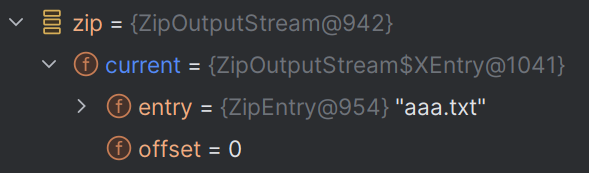
}底层: 每次调用putNextEntry()都会创建一个ZipEntry对象, 然后把文件名赋值给entry属性, entry属性就是用来写入数据的, 所以不用单独创建输出流